Welcome to your monthly release roundup, where you can learn about the most impactful updates in the new CreatorIQ platform.
This month, we focused on the fundamentals: better creator data from the moment someone joins your program, and sharper tools for managing content and campaigns without the workarounds. Here's what's new.
Know more about your creators, sooner
We're always working to make sure the data you see in CreatorIQ is accurate, complete, and ready when you need it.
|
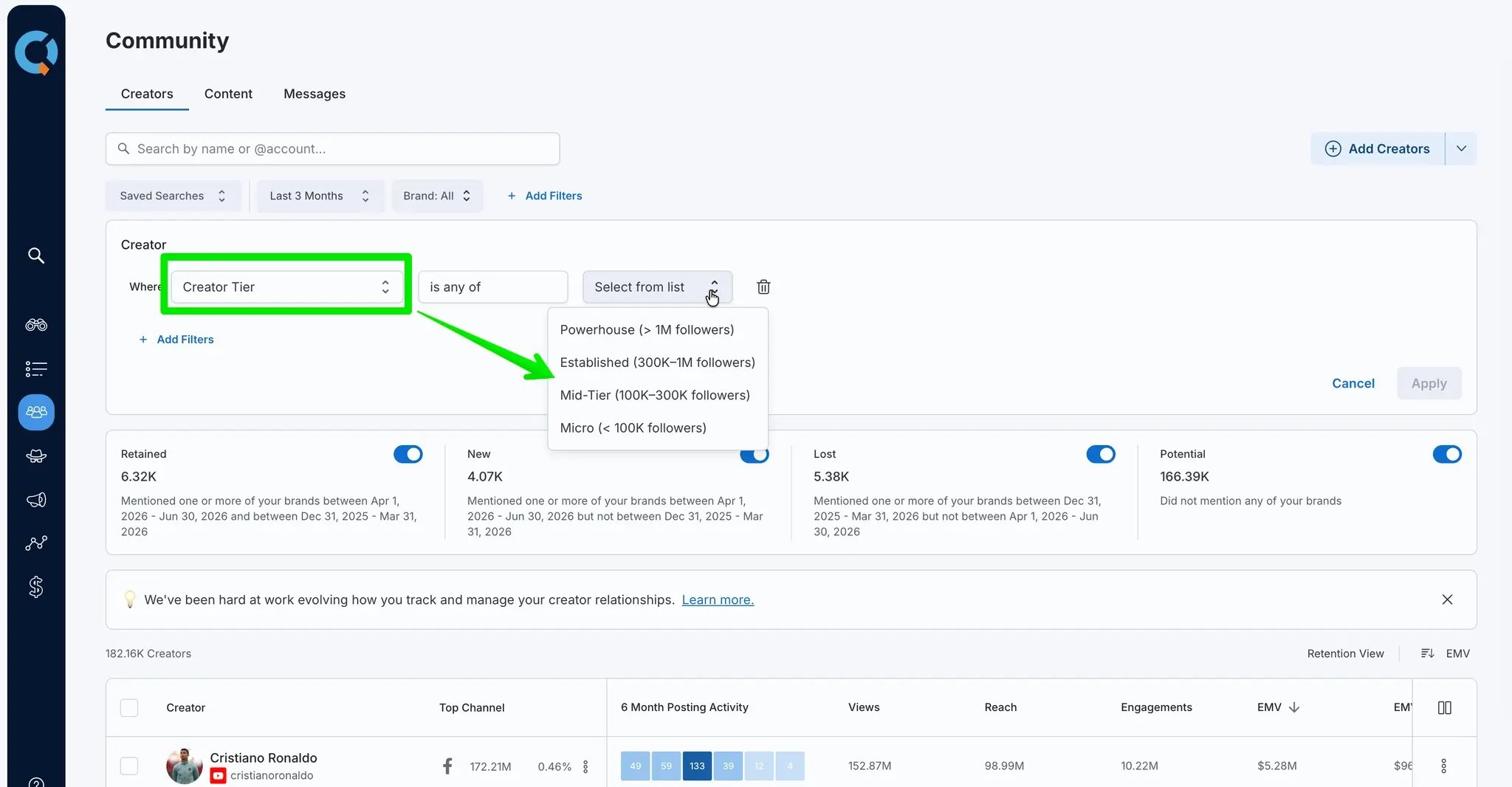
Filter your roster by creator tier
A Creator Tier filter is now available in Community → Creators and Campaign → Creators, letting you segment by audience size across four tiers: Powerhouse (1M+ followers), Established (300K–1M), Mid-Tier (100K–300K), and Micro (under 100K). The filter supports multi-select, so you can compare tiers or focus on a specific segment.
|
|
Content Spotlight processing status
When a creator's Content Spotlight data is still syncing, the platform now displays a clear status message so you know data is on its way rather than missing — reducing confusion and unnecessary support requests.
|
|
Creator profile data for newly added creators
When a creator is added to CreatorIQ but hasn't yet fully synced with our Discovery database, their profile now immediately displays metrics and content samples pulled from their 20 most recent posts — instead of showing an empty state while you wait. Once full historical data is available, the profile automatically switches to the standard 90-day view. This applies whether creators are added by URL, from Discovery, via Bulk Import, or through Creator Merge.
|
|
Less clicking, more doing
Upgrades that reduce friction and keep your team moving without workarounds.
|
More tracking keywords per campaign
The maximum number of tracking keywords per campaign has been raised from 25 to 100, reducing the need for workarounds on large campaigns tracking talent rosters, multi-show networks, or major live events. As a reminder, keywords automatically match hashtag and @mention variants — so you may need fewer than you think.
|
|
Set a brand in Campaign Settings after creation
You can now add a brand to a campaign after it's already been created, as long as one wasn't set during the initial setup. No more having to recreate a campaign just because the brand field was skipped.
|
|
Copy headline metrics to clipboard
A copy icon now appears next to headline metric values across the Content tab, Creator tab, and Campaigns → Posts tab. One click gets the raw number into your clipboard — no more manual highlighting when pulling figures for a report or presentation.
|
|
Smarter workflows for creators and content—coming by June 30th
These updates come directly from customer feedback—built to tighten up the workflows your team uses every day.
|
Creator Import Template improvements—now coming in mid-July
The creator import template has been updated to be more reliable and easier to use—cleaner validation, fewer errors, less manual cleanup.
|
|
See campaign information on post cards
Campaign context now surfaces directly on content cards in your Community view, so you can see what's been attributed at a glance—no more hunting through campaign views to confirm coverage.
|
|
Assign creators to Lists and Campaigns from the content view (Coming June 30th)
You can now add a creator to a List or Campaign directly from the content view. One less reason to context-switch mid-workflow.
|
|
For BenchmarkIQ customers
|
A dedicated BenchmarkIQ experience
If your account is configured for BenchmarkIQ only, you'll now land directly in BenchmarkIQ when you log in. No extra navigation required. If you have access to multiple networks, you'll see a prompt letting you choose to continue to BenchmarkIQ or switch to a different environment. Clean, simple, no dead ends.
|
|

